
How to Turn On a Red Dot Sight

Most red dot sights wake up when you press the plus button on the housing or rotate the brightness dial past the zero mark. The exact switch you need to touch depends entirely on the style of your optic. Some models use soft rubber buttons on the frame, others use a numbered dial, and several modern units power on the second they detect movement.
A dark lens usually comes down to simple power controls or a blocked battery rather than a broken unit. Brand-new sights often ship with an insulating plastic film tucked beneath the battery cap, or the coin cell might sit upside down in the compartment. Identifying the control layout on your optic makes it easy to switch the glass on and avoid turning the wrong screws.
The Short Version
- Clear the firearm chamber, drop the magazine, and confirm the firearm is unloaded before handling the optic.
- On push-button sights, press the rubber plus (+) button once firmly or hold it down for three seconds.
- On rotary dial sights, twist the circular turret dial from "0" or "OFF" to a visible setting like 4 or 5.
- On motion-sensing sights, pick up or tap the optic to wake it, keeping in mind that new units require a manual button press the first time.
- If the glass stays dark, remove the battery cap, peel off any clear protective shipping sticker, confirm the positive (+) side faces outward, and tighten the cap snugly.
Identify Your Optic Switch Type
Before turning on your red dot sight, check which switch mechanism controls the electronics. Red dot sights generally rely on three main designs: rubber push buttons, mechanical rotary dials, or motion-activated sensors.
Push-button models use soft rubber pads sealed directly into the housing. On an open reflex sight, often called an open-window sight, these buttons sit on the left or right side of the frame to keep the optic slim. This low-profile shape fits cleanly on handgun slides and rifle rails. You will see an embossed plus (+) and minus (-) icon on the rubber pads.
Rotary dial models are common on enclosed tube sights. Instead of rubber buttons, these units feature a circular turret knob on top of the body or on the side, marked from 0 up to 10 or 11. The battery compartment usually sits directly under this dial cap.
Motion-activated models often look identical to push-button sights, but they house an internal movement sensor that powers the unit down during rest. Some compact sights also feature automatic ambient light sensors that turn on whenever natural or indoor light hits the front of the frame.
Step-by-Step Activation for Push-Button and Dial Sights
Always practice safe firearm handling before touching optic controls. Drop the magazine, rack the slide or bolt, and visually confirm the chamber is empty before looking through the glass.
Turning On Push-Button Sights
- Locate the rubber plus (+) and minus (-) buttons on the side or top of the housing.
- Press the plus (+) button once firmly. On many models, a single quick tap lights up the aiming dot immediately.
- If the glass stays dark, hold the plus (+) button for two to three seconds. This delay prevents accidental activation inside a soft range bag.
- Tap the plus (+) button to raise brightness, or tap the minus (-) button if the reticle flares or blooms.
- To turn off the optic, hold down the minus (-) button for three to four seconds, or press both buttons together.
Turning On Rotary Dial Sights
- Locate the circular turret knob on top or on the side of the sight tube.
- Check that the dial indicator lines up with "0" or "OFF".
- Grip the textured edge and rotate the knob clockwise until it clicks into a numbered setting.
- Turn the dial to setting 4 or 5 for normal light. Settings 1 and 2 are faint night-vision levels that appear invisible in daytime.
- Look through the lens to confirm the dot is visible. Twist the dial back to "0" or "OFF" when finished shooting.
How Motion-Activated Sights Switch On and Off
Motion-sensing auto-on sights keep your reticle ready without requiring manual button presses under stress. But many shooters get nervous when a new optic fresh out of the box will not light up simply by picking it up. Nearly all motion-sensing optics require a manual startup the very first time. You must press the side plus (+) button to turn on the main electrical circuit before the motion-sensing features can take over.
Once turned on manually, the optic manages power automatically. When the firearm sits motionless on a table or in a safe for a few minutes, an internal sensor puts the LED emitter to sleep. This standby mode draws only a tiny trickle of battery power, allowing a single battery to last for years.
As soon as you pick up the firearm, the sensor detects movement and wakes the reticle instantly at your last brightness setting.
You can also turn these sights off manually when traveling. Road vibration in a car trunk can repeatedly wake a motion-sensing optic and drain the battery. Holding down the power buttons shuts the unit down completely until your next manual press.
Why the Dot Is Not Showing: Fast Troubleshooting Checklist
If you followed the activation steps and your optic lens remains blank, simple battery or positioning issues are almost always the cause. Work through this checklist to get the reticle working:
- Remove the clear shipping sticker: Manufacturers often pack coin batteries with a thin, transparent plastic disc underneath to prevent battery drain during shipping. Unscrew the battery cap, remove the coin cell, peel off any clear protective film, and put the battery back in.
- Confirm battery polarity: Flat coin batteries like CR2032 or CR1632 cells have a smooth face marked with a plus (+) symbol. On most optics, the positive (+) side must face outward toward the screw cap. If inserted upside down, the circuit will not close. Check the underside of the cap for a plus (+) or minus (-) marking.
- Tighten the battery cap securely: A loose cap will not press the contacts firmly against the battery surface. Use a coin or flat tool to tighten the cap until it seats snugly against the rubber sealing ring.
- Check ambient lighting: Under bright sunlight, an illuminated aiming dot set to level 1, 2, or 3 can look invisible. Step indoors, shield the lens with your hand, or tap the plus (+) button ten times to check the reticle at maximum brightness.
- Align your eye position: The dot projects onto the curved glass and is only visible from behind the optic window. Look straight through the center of the glass. Checking how backup iron sights align through the optic glass can help pull your eye directly onto the dot.
- Install a fresh battery: Batteries included in packaging can lose power while sitting in storage. Insert a fresh, name-brand lithium battery to confirm your power cell is healthy.
What to Leave Alone: Why You Should Never Force Adjustment Screws
When an optic will not turn on, some shooters mistake the small metal screws on the housing for power controls. Doing this can cause permanent damage to your optic.
These metal dials are turret screws designed exclusively for windage and elevation adjustments. Windage moves the aiming dot left and right, while elevation moves it up and down. These controls are used strictly for zeroing, which means adjusting the aiming dot so your shots hit exactly where the dot points at a set distance, such as 25 yards for handguns or 50 yards for rifles.
Adjustment screws are recessed, slotted screws marked with directional arrows and letters such as "UP" or "R". They click mechanically when turned, but they have no connection to the electrical power system.
Twisting adjustment screws while looking for power will knock your sight completely out of alignment. If you force them past their travel limits, you can strip the internal threads and ruin the waterproof seals. Leave these screws alone until the dot is turned on and you are ready to zero your firearm at the range.
What to Look for When Choosing a Replacement Optic
If your current sight has broken internal wiring, corroded battery contacts, or stripped buttons, replacing it with a dependable modern optic will solve your power headaches.
Choose a switch design that suits your shooting style. If you want simple operation with clear visual confirmation, a rotary dial shows you at a glance whether the sight is active or off. If you want a smooth, low-profile sight for concealed carry or tactical rifles, push-button models with raised rubber pads let you adjust brightness easily by feel.
Motion-sensing auto-on technology is an excellent choice if you want your optic ready at all times. Sights with motion sensors wake up the instant you lift your firearm and sleep when stationary, protecting battery life while staying ready for home defense.
Battery compartment location is another key feature. Optics with top-loading or side-loading battery trays let you swap coin batteries without removing the sight from your firearm. Sights with bottom-mounted compartments force you to take off the optic, breaking your mount tension and requiring you to re-zero your shots.
Finally, check your mounting footprint to confirm the screw pattern matches your slide cutout, adapter plate, or standard 20mm Picatinny rail. Whether you are mounting on a defensive shotgun, a hunting rifle, or finding an optic suited for target pistols and rimfire plinkers, choosing an optic with intuitive controls and simple battery access ensures your sight stays ready whenever you need it.
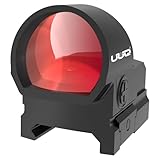
- ARS Mark9.0
ARS Mark is a ranking system developed by bestairriflescopes.com. ARS Mark has no relationship or impact from any manufacturers or sales agent websites. Learn more
- BrandUUQ

- ARS Mark9.0
ARS Mark is a ranking system developed by bestairriflescopes.com. ARS Mark has no relationship or impact from any manufacturers or sales agent websites. Learn more
- BrandOsight

- ARS Mark8.8
ARS Mark is a ranking system developed by bestairriflescopes.com. ARS Mark has no relationship or impact from any manufacturers or sales agent websites. Learn more
- BrandCVLIFE

- ARS Mark8.6
ARS Mark is a ranking system developed by bestairriflescopes.com. ARS Mark has no relationship or impact from any manufacturers or sales agent websites. Learn more
- BrandMonstrum
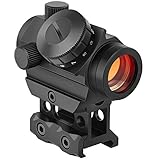
- ARS Mark8.6
ARS Mark is a ranking system developed by bestairriflescopes.com. ARS Mark has no relationship or impact from any manufacturers or sales agent websites. Learn more
- BrandMidTen

- ARS Mark8.6
ARS Mark is a ranking system developed by bestairriflescopes.com. ARS Mark has no relationship or impact from any manufacturers or sales agent websites. Learn more
- BrandAOMEKIE

- ARS Mark8.6
ARS Mark is a ranking system developed by bestairriflescopes.com. ARS Mark has no relationship or impact from any manufacturers or sales agent websites. Learn more
- BrandStrongTools

- ARS Mark8.2
ARS Mark is a ranking system developed by bestairriflescopes.com. ARS Mark has no relationship or impact from any manufacturers or sales agent websites. Learn more
- BrandGeneric
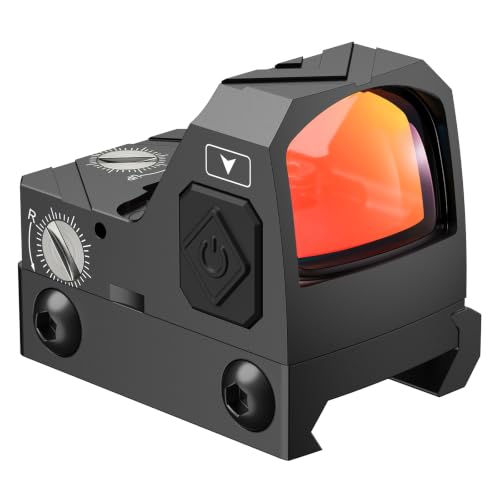
- ARS Mark7.6
ARS Mark is a ranking system developed by bestairriflescopes.com. ARS Mark has no relationship or impact from any manufacturers or sales agent websites. Learn more
- BrandCVLIFE
Last update on 2026-10-02 / Affiliate links / Images, Product Titles, and Product Highlights from Amazon Product Advertising API
FAQs
How can I tell if my red dot sight is completely turned off?
Look directly through the lens in a dark room or place your hand over the front of the optic to block incoming light. If you see no red aiming dot or faint internal glow on the glass, the LED emitter is fully powered down. On rotary models, confirm that the dial indicator points directly to "0" or "OFF".
Can I leave my red dot sight turned on all the time?
Modern red dot sights draw minimal electric power, and quality units can run continuously for years on a single coin battery at moderate brightness settings. Optics equipped with motion-sensing auto-on features automatically enter a low-power sleep state when resting still, making them safe to leave active at all times. But on manual rotary dial optics without auto-shutoff, turning the knob to "0" prevents unexpected battery drain during storage.
Why does the red dot look blurry or smeared after I switch it on?
A blurry, flared, or starburst reticle is usually caused by setting the brightness level too high for your current environment, which causes light to flare against your eye. Lower the brightness setting until the dot becomes a sharp, clean aiming point. If the reticle still appears distorted at lower brightness, point your phone camera at the lens; if the dot looks round on your screen, an astigmatism in your shooting eye is bending the light.
Can cold weather stop a red dot sight from turning on?
Freezing temperatures can slow down the chemical activity inside standard lithium coin batteries, causing voltage to drop below the level needed to illuminate the LED emitter. If your sight fails to power on in severe cold, warming the optic housing with your hands or bringing it indoors will often restore the reticle. Using fresh, high-grade lithium batteries helps maintain steady voltage during winter shooting.


12 Best 22 Pcp Air Rifle For Hunting of 2026 With Quiet Power

7 Best 22 Pcp Air Rifle Under 300 of 2026 For Backyard Pest Control

10 Best 22 Break Barrel Air Rifles of 2026 For Backyard Pest Control

10 Best 30 Caliber Pcp Air Rifle of 2026 For Medium Game

Top Best 177 Air Rifle Under 100: Budget-Friendly Picks for 2026

How to Safely Reload Shotgun Shells at Home

11 Best Co2 Air Rifle For Pest Control of 2026 To Ensure Humane Dispatch

12 Best Inexpensive Air Rifles of 2026 For Dependable Backyard Accuracy






